Work Flows
A workflow is a step-by-step path that a task or service follows from start to finish.
Each business process can have multiple workflows depending on the type of work. For example, for the “Customer Complaint” process:
- For simple issues like late delivery, the workflow may include just logging the complaint and resolving it by the support team.
- For more serious issues like product malfunction, the workflow may include technical inspection, replacement approval, and logistics coordination.
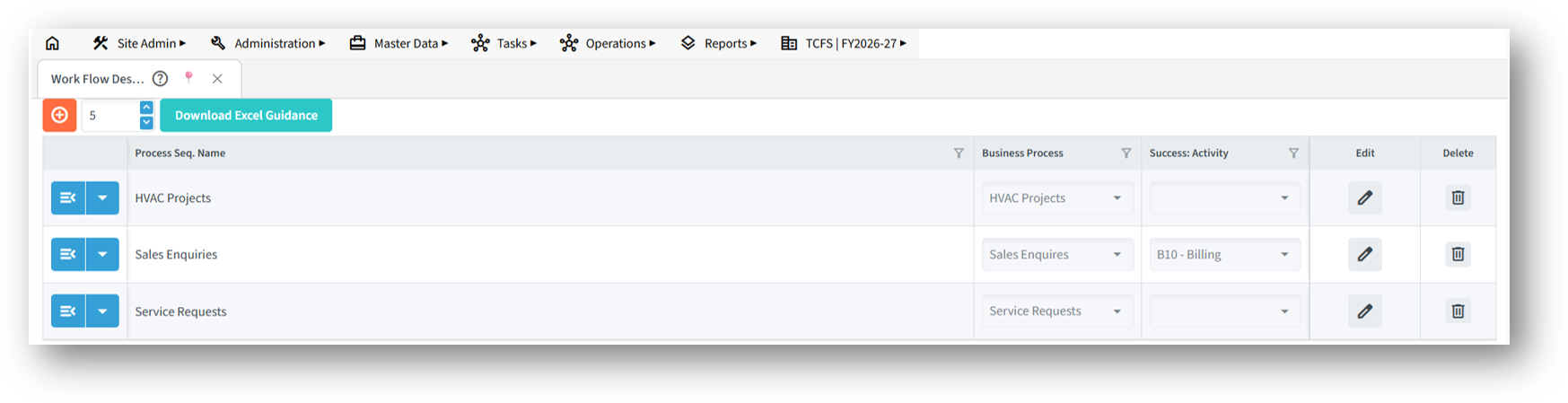
If you’re creating an internal workflow – like for leave requests – the workflow might just have a few steps like Submit Request, Manager Approval, and HR Confirmation.
Different services can also follow different workflows. For example:
- A simple online product enquiry may have steps like Collect Enquiry, Send Quotation, and Close Enquiry.
- A full product sales cycle may include Lead Generation, Demo Scheduling, Order Placement, Delivery, and After-Sales Support.
- In some cases, the workflow may be focused only on coordination, such as managing a marketing campaign with steps like Content Creation, Design Approval, and Campaign Launch.
The Success Stage option is used to mark the final or successful completion step of a workflow.
- Helps track which tickets or tasks are completed successfully.
- Useful for generating graphs and reports based on workflow performance.
- Helps in analysing ticket success rate, delays, and team effectiveness.
Once set, this stage will be reflected in charts, dashboards, and analysis reports, giving insights into how many tasks reached completion and how efficiently they were handled.
You can design workflows to suit any type of work scenario, whether it’s customer-facing, internal operations, or project-based work. This makes your system powerful and adaptable to your exact business needs.