Records Export
Navigation
- Navigate to the Reports tab.
- Select Records Analysis > Records Export.

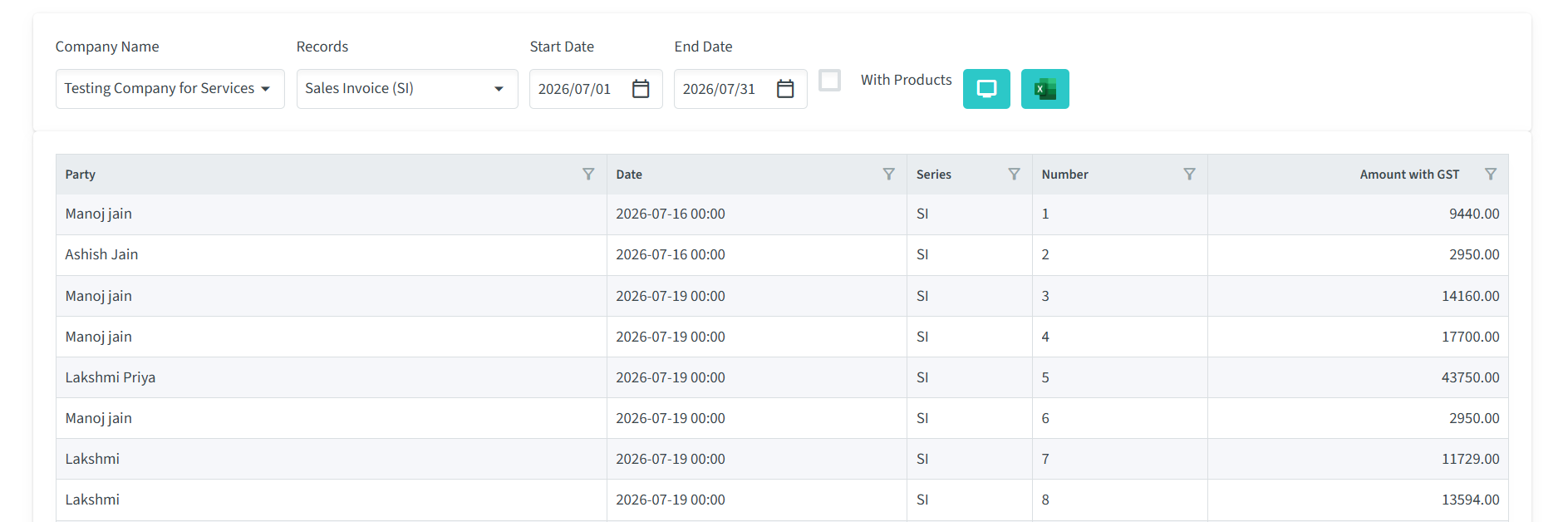
The Records Export Analysis provides a detailed report of records created within the application for a selected company and time period. Unlike the dashboard statistics, this report allows you to export record data and review individual transactions along with the products associated with each record. It is particularly useful for generating business reports, verifying sales data, tracking transactions, and performing product-wise analysis.
Using this feature, you can filter records by company, record type, and date range to generate a customized report. You also have the option to include product details, enabling a comprehensive view of the items associated with each record. The generated report can be exported for further analysis, auditing, or record-keeping.
Report Filters
- Company Name
Select the company whose records you want to analyse. Only records belonging to the selected company will be included in the report. - Records
Choose the type of record you want to analyse, such as Sales Invoice (SI), Quotation, Sales Order, Purchase Order, or any other enabled record type. - Start Date / End Date
Specify the date range for the report. Only records created within the selected period will be included in the analysis. - With Products
Enable this option to include detailed product information for each record. The exported report will display product names, quantities, prices, and other related details, making it easier to analyse product-wise sales and transactions. - View
Displays a list of records based on the Company Name, Record Type, Date Range, and other filters selected above. This allows you to review the matching records directly in the application before exporting them. - Export
Exports the filtered records directly into an Excel spreadsheet for offline reporting and analysis.

Report Results Table
After applying the selected filters, the system displays the matching records in a table. Each row represents an individual record, while the columns provide key information about that record.
The table includes the following details:
- Party – Displays the name of the customer, supplier, or other party associated with the record.
- Date/Time – Shows the date and time on which the record was created.
- Series – Displays the document or voucher type associated with the record, such as SI (Sales Invoice), PI (Purchase Invoice), SO (Sales Order), or other enabled document series.
- Number – Displays the unique document or voucher number assigned to the record.
- Amount with GST – Shows the total record amount, including the applicable GST.
The table provides a quick overview of the filtered records and allows users to review the relevant transaction details before exporting the data.