Account Vouchers
Account Vouchers are used to record and manage financial transactions in the ERP. They capture accounting entries such as Payments, receipts, and other financial transactions, including the accounts involved and their debit or credit amount.
How to Access
- From the main menu, click Operations.
- Select Finance.
- Click Account Voucher.

Selecting a Branch and Voucher Type
The Branch identifies the location associated with the account vouchers you want to view or create. The available branches are configured according to the organization’s requirements.
Select the appropriate branch before working with the Account Voucher.
The Voucher Type dropdown is used to select the type of financial voucher to view or create.

The records displayed on the screen depend on the selected Voucher Type.
Account Voucher Options
The Account Voucher screen provides the following options:
- Records Pending Approval – Displays account vouchers that have been saved but are awaiting approval.
- Approved Records – Displays account vouchers that have been approved.
- New Record – Opens the form to create a new account voucher.

Records Pending Approval
The Records Pending Approval section displays account vouchers that are saved but have not yet been approved.
The table displays:
- Date – Date of the account voucher.
- Series – Voucher series associated with the transaction.
- Number – Unique Voucher Number.
- Party – Party or account associated with the voucher.
- Cr Amount – Credit amount recorded in the voucher.
- Dr Amount – Debit amount recorded in the voucher.
- View – Opens the voucher for review.
- Excel – Export the displayed pending records.

Approving a Pending Record
- Select the Branch.
- Select the required Voucher Type from the Voucher Type dropdown.
- Open Records Pending Approval.
- Locate the account voucher you want to review.
- Click View.
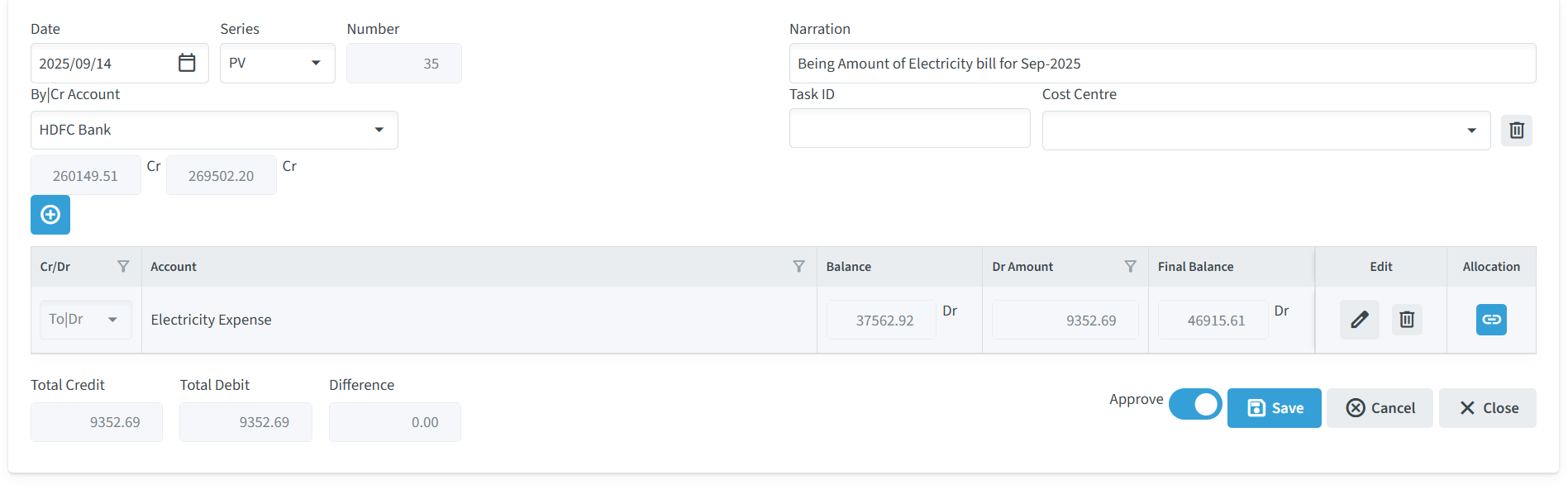
- Review the voucher details.
- Enable Approve.
- Click Save to save the approval.
- The approved record is moved to Approved Records.

Approved Records
The Approved Records section displays account vouchers that have been approved.
User can select the required Month/Year to view records for a specific period. The screen also provides options to control the number of records displayed and export the records to Excel.
The table displays:
- Date
- Series
- Number
- Party
- Cr Amount
- Dr Amount
- View
