Discount List
A Discount List is used to define and manage discounts for products. Discount lists can be created and assigned to products according to the organization’s requirements.
How to Access
- From the main menu, Click Master Data.
- Select Sales.
- Click Discount List.
How To Enable
1. Enable Company Setting
- Go to Administration → My Company.
- Open Company Settings.
- Enable Price and Discount Lists.
- Save the changes.
2. Enable Role Permission
- Go to Master Data → Users.
- Open the required user.
- Go to Role and Permissions.
- Enable Manage Products.
- Save the changes.
3. Enable Record Permission
- In the same user’s Permissions, go to Records.
- Find the Sales Invoice record.
- Enable the View permission.
- Save the changes.
Discount List Overview
The Discount List page displays the discount lists configured in the system.
- Discount List Number – Displays the name or identifier of the discount list.
- Edit – Opens the discount list for editing.
Creating a New Discount List
Click the + button at the top-left of the Discount List page. A new row is added to the list.
Discount List Number
Enter the required Discount List Number to identify the discount list.
- Click ✓ to save the new discount list.
- Click × to cancel the entry.
Managing Discount List Options
Each discount list has a dropdown menu with additional options.
Click the dropdown arrow next to a discount list to view the available options:
- Products – Opens the products associated with the selected discount list.
- Make a Copy – Creates a copy of the selected discount list.
Adding Discounts to Products
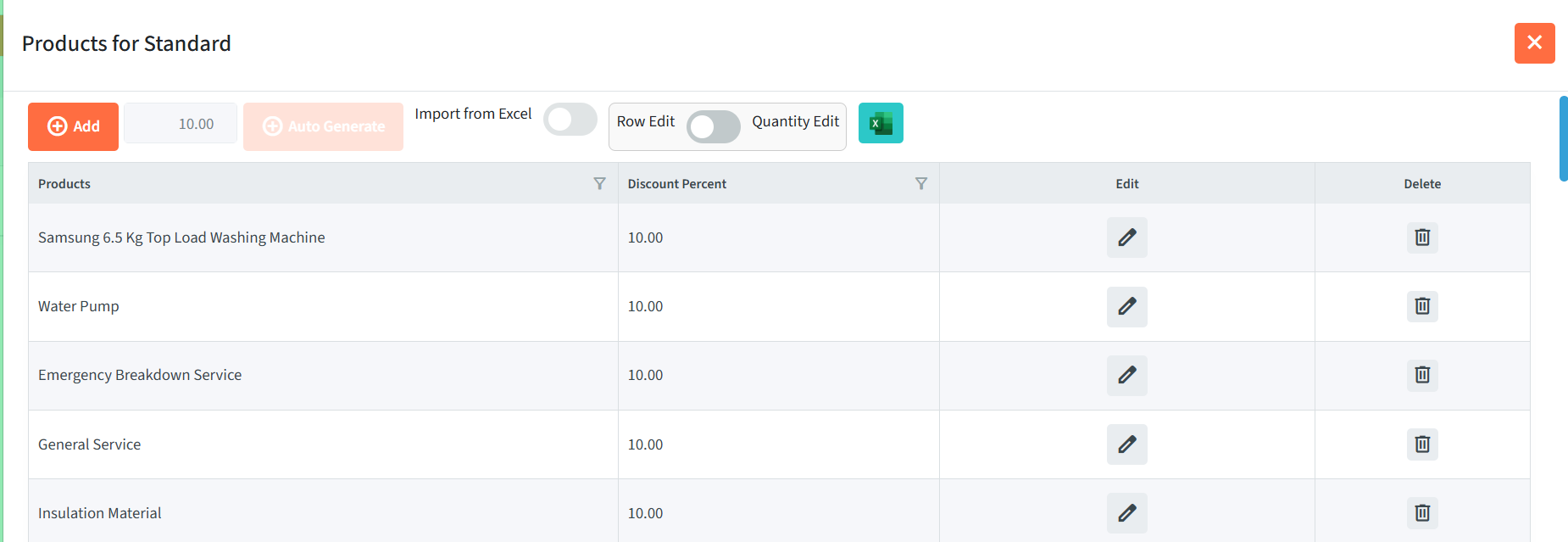
Click Products from the dropdown menu to open the product list for the selected discount list.
The product page allows you to add and manage products and their discount information.
The available options include:
- Add – Add a product to the discount list.
- Auto Generate – Automatically generate product entries, where available.
- Import from Excel – Import product information from an Excel file.
- Row Edit – Edit product information directly in the table.
- Quantity Edit – Edit quantity-related information.
- Excel – Work with the product list using Excel.
- Edit – Modify an individual product entry.
- Delete – Remove a product from the discount list.
Product Table
| Field | Description |
|---|---|
| Products | Displays the products included in the discount list. |
| Edit | Allows the product entry to be modified. |
| Delete | Removes the product from the discount list. |
Adding a Product
- Click Add.
- Enter or select the required product.
- Enter the applicable discount information.
- Save the product entry.