User Types
User Types includes account types. In any Business, there are many user that interact with company at different stages for their work. Application supports various user types like: Employee, Customer, Supplier, Dealer, Distributor, Agent etc.
You can enable of disable user types from the list.
NOTE
You cannot create a custom user category on your own. If you require a new user type, you must submit a formal request. This is because changes to user categories impact the entire system design. Though you can change the title like “Customer can be “Patient”
ProcessGrid currently allows following types of users or accounts. More can be added as desired or these can be renamed modified as desired.
- Customer
- Supplier
- Distributor
- Dealer
- Agent
- Referrer
- Cost Center
- E-Commerce
- Employee
- Company
- Transporter
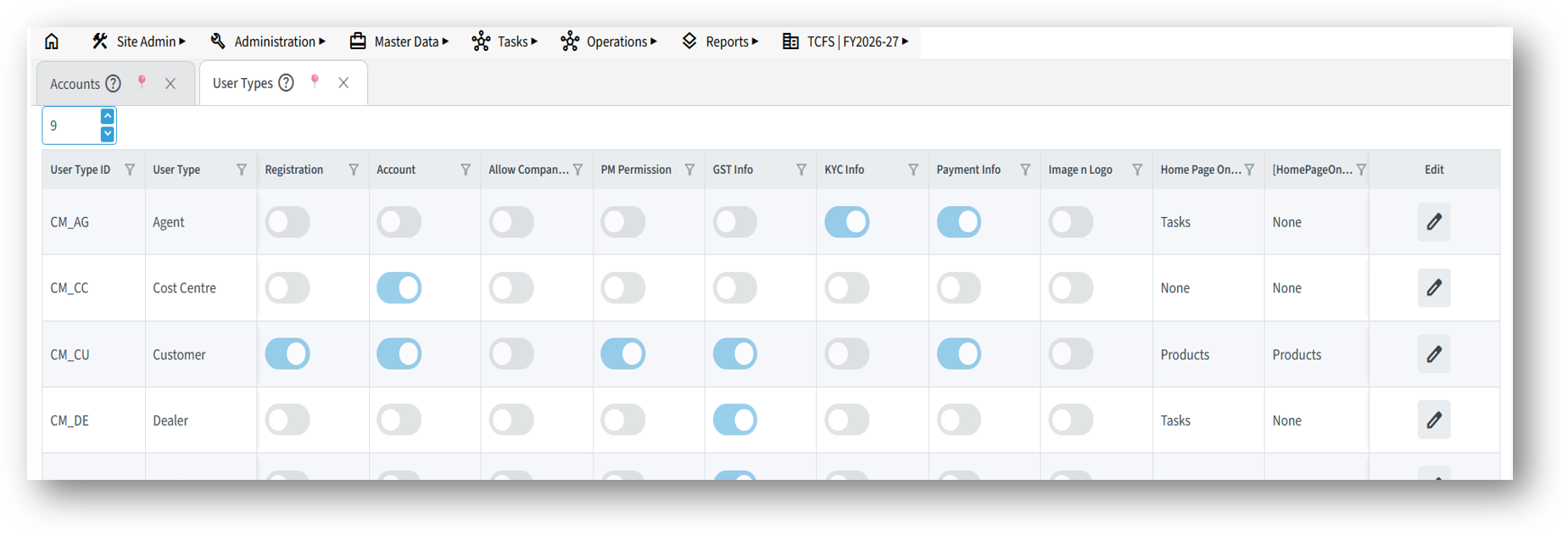
There are property settings for each of these user types. You can rename “Customer” to “Patient” for a hospital ERP.
The “My Company” or “Company” user type means your company which will issue invoices, quotations etc. Tje company which is installing the software. There could be more than one company if you are running multiple companies within same Application. We will discuss company level settings in section dealing with creating accounts.
This is particularly useful when, a single sales or marketing team handles inquiries for multiple group companies.
Customers often request products or services from various companies within the same group.
You need to issue quotations, purchase orders, or sales invoices from different companies under a shared management.
Following settings are available which will define how these users will interact in the ProcessGrid ERP:
- Registration: Allow login in tot he system and hence create credentials.
- Account: Allow financial transaction like invoicing in their name.
- Allow Company Selection: While logging in to the system allow company and accounting year (financial year) selection.
- PM Permission (or Notification): Allow access to notifications, a WhatsApp like internal system.
- GST Info: Collect GST info, required for billing.
- KYC Info: Collect KYC Information like Aadhar, PAN, etc.
- Payment Info: Collect bank information for making direct payments.
- Image & Logo: Mainly for “Company” to be printed in invoices. but you can collect user images if required.
A ledger (account) represents a company or entity in the system (e.g., a supplier, customer, or distributor).
A login user is a person who can access the system with credentials.
Each ledger (account) can have multiple login users.
For example:
A supplier may have two employees with separate login credentials. Both users will access the same data tied to that supplier’s account.
This structure ensures secure and shared access to relevant information without data duplication.
User Type Permissions
This option allows you to set permissions based on user types, such as Customers, Suppliers, or Employees. It helps control who can use which business processes. The option is same as User Teams Permissions (refer above) for details.
For example, the Customer Complaint process should be available to all customers, so you can allow access to the Customer user type. And hence you will not be required to assign permission to each and every customer individually.
Similarly, the Supplier Registration process should be available to all suppliers, so you can enable it for the Supplier user type.
However, giving access to these processes (like customer complaints or supplier registration) to all employees or internal teams is not recommended. Instead, for employees or specific departments, use the User Team Permissions option explained earlier to limit access only to relevant teams.
This setting ensures that each process is only visible and usable by the correct type of user, keeping your system clean, secure, and relevant to each user’s role.
We will discuss permissions to set to specific users later while we create users.