Accounts Opening Balance
The Accounts Opening Balance screen is used to view and maintain the opening balances of the accounts created for the company.
It displays the company’s accounts along with their Account Type, Account Group, Account Name, Opening Debit Balance, and Opening Credit Balance. From here, you can also update the opening balance of an individual account.
Navigation
- Click Operations from the top navigation menu.
- Select Accounts.
- Click Accounts Opening Balance from drop down.
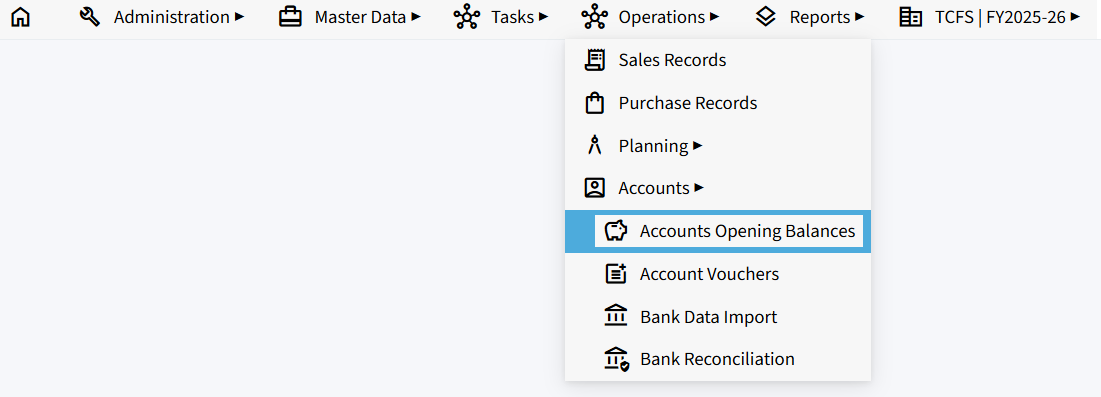
Accounts Opening Balance
The screen displays the accounts available in the company. These may include Debitor, Creditor, Asset, Liability, Income, and Expense accounts.
For each account, the following details are displayed:
- Account Type – Displays the type of account, such as Assets or Liabilities.
- Account Group – Displays the group to which the account belongs, such as Sundry Debtors or Sundry Creditors.
- Account Name – Displays the name of the account.
- Opening Dr Balance – Displays the opening debit balance entered for the account.
- Opening Cr Balance – Displays the opening credit balance entered for the account.
- Edit – Allows you to update the opening debit and credit balances of the account.

Updating an Opening Balance
- Locate the required account from the list.
- Click the Edit icon corresponding to the account.
- Update the Opening Dr Balance and/or Opening Cr Balance as required.
- Save the changes.

Import from Excel
The Import from Excel option allows you to import account opening balance details using an Excel file instead of entering the balances individually.
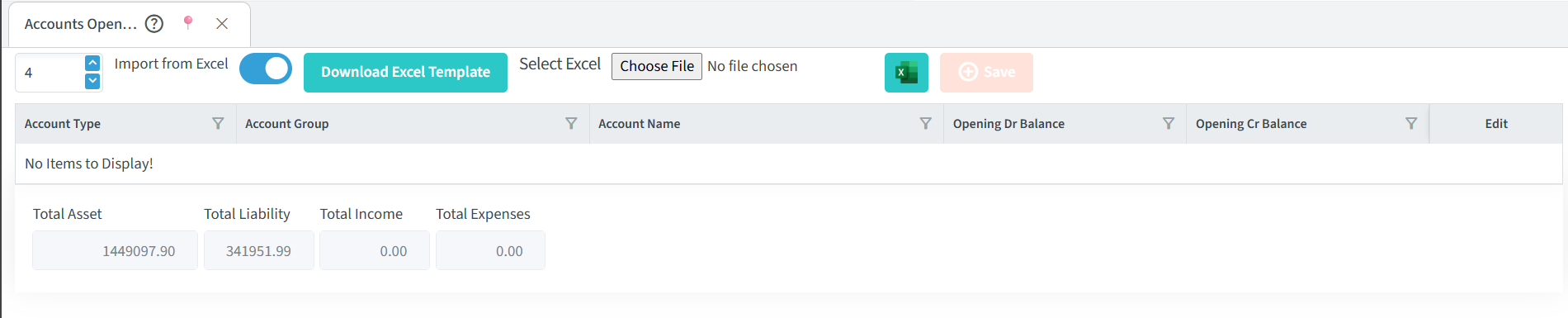
Steps to Import from Excel
- Turn on the Import from Excel toggle to open the Excel import options.
- Click Download Excel Template to download the standard Excel template.
- Enter the required account opening balance details in the downloaded Excel template.
- Click Choose File and select the completed Excel file.
- Click Save to save the imported opening balance details.
Account Summary
The bottom section of the screen displays the combined totals of the accounts:
- Total Asset – Total value of all asset accounts.
- Total Liability – Total value of all liability accounts.
- Total Income – Total value of all income accounts.
- Total Expenses – Total value of all expense accounts.
Note: Opening balances should be entered in the appropriate Debit (Dr) or Credit (Cr) field according to the account’s opening balance.