Users
The Users is a core administrative module where you can view, manage, and control access for every user registered in the system. It ensures that each user has the appropriate roles, rights, and permissions to perform specific actions based on their responsibilities. 
If a user does not already have an account in the system, you will need to create one for them.
Creating New User
Click on the orange ‘+’ button.
1. Select User Type
Begin by selecting the User Type. This defines the role or category of the user, such as:
- Customer
- Employee
- Referrer
- Supplier


3. Enter User Full Name. This will be displayed across the system wherever the user interacts
4. Enter User Phone Number and set a Password. Click on Register.

Important
Choosing the correct User Type helps in managing access and user roles according to business requirements.
Create a secure password for the user account. The password must meet the following requirements:
- At least one uppercase letter
- At least one lowercase letter
- At least one number
- At least one special character
- Minimum 6 characters in length
Additional settings
Once the user list is displayed, you will find additional settings available for each account. These include:
- User Profile
- Permissions
- Change Password.
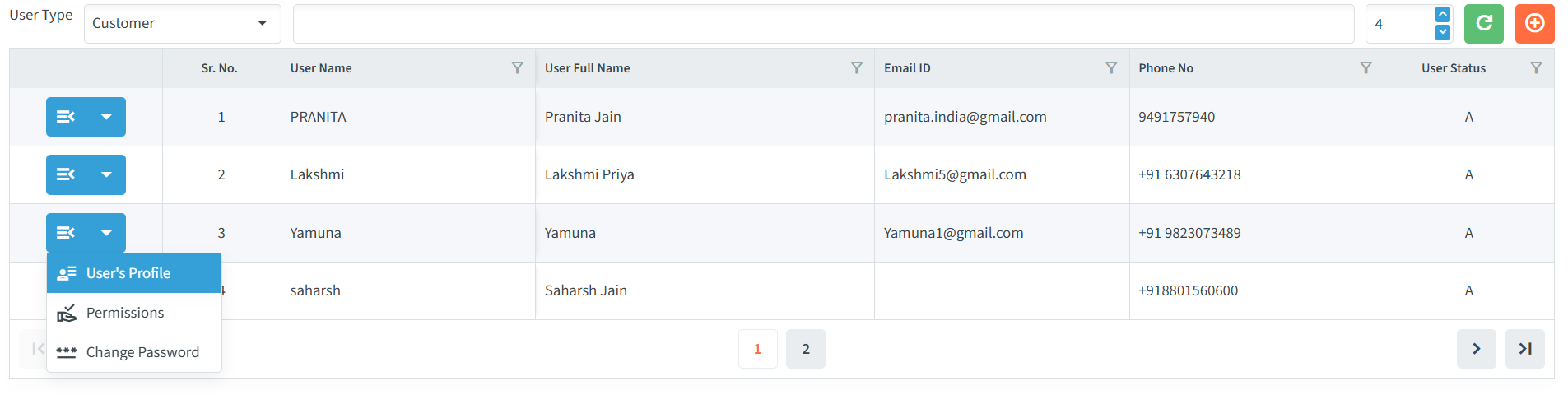
To access these options, click on the dropdown button. It will display all the available settings for that user.
